---
title: Set Up a Custom Role
description: Custom Roles are set-up by Process Owners in the 'Roles &amp; Users' menu option.
---

[Skip to content](https://knowledge.triaster.co.uk/set-up-custom-role#main-content)

[Contact Support](https://knowledge.triaster.co.uk/kb-tickets/new)

[![triaster-logo-hex.svg\]](https://knowledge.triaster.co.uk/hubfs/TRIASTER/img/triaster-logo-hex.svg)](https://www.triaster.co.uk/)

- [Knowledge Base Home](https://knowledge.triaster.co.uk/)

Open main navigation

Close main navigation

- [Knowledge Base Home](https://knowledge.triaster.co.uk/)
- [Contact Support](https://knowledge.triaster.co.uk/kb-tickets/new)

 Welcome. How can we help you?

- There are no suggestions because the search field is empty.

1. [Triaster Knowledge Base](https://knowledge.triaster.co.uk/)
2. [Process Execution Pack - Ask The Crowd](https://knowledge.triaster.co.uk/process-execution-pack-ask-the-crowd)
3. [Optimising](https://knowledge.triaster.co.uk/process-execution-pack-ask-the-crowd#optimising)

# Set Up a Custom Role

## Custom Roles are set-up by Process Owners in the 'Roles & Users' menu option.

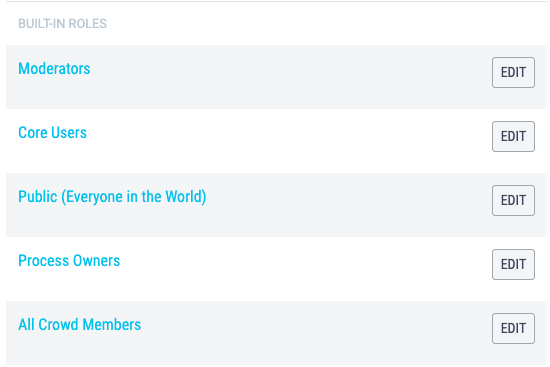
Out of the box, there are five roles built-in to the ATC platform, each with [specific permissions](https://knowledge.triaster.co.uk/built-in-roles).

These permissions cannot be changed, however new bespoke roles can also be set up, and any of the permissions or **Features** available can be granted to a custom role.
![Screenshot 2021-09-30 at 12.40.28](https://knowledge.triaster.co.uk/hs-fs/hubfs/Screenshot%202021-09-30%20at%2012.40.28.png?width=455&name=Screenshot%202021-09-30%20at%2012.40.28.png)

Any User can be assigned to a custom role but Core Users must first be purchased before a User has can be assigned as a Core User.

Only Process Owners can set up a new role. 


 Setting up a Custom Role

- Click on the **Dashboard** menu option found at the top right-hand side of the screen.
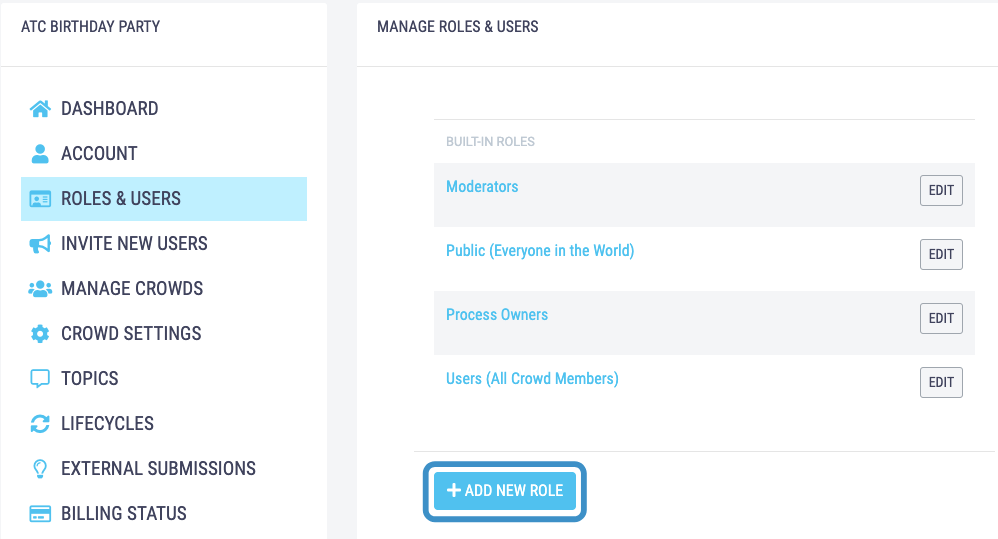
- Click on the **Roles & Users** menu option found on the left-hand side of the page.
- You can also get to the **Roles & Users** page by clicking onto the person icon in the top-right of your screen and selecting **Roles & Users** from the dropdown menu.
- Under the built-in roles section, click the **+Add New Role** button.  
  ![Untitled design - 2021-09-30T152008.604](https://knowledge.triaster.co.uk/hs-fs/hubfs/TRIASTER/img/Knowledge%20Base/Untitled%20design%20-%202021-09-30T152008.604.png?width=655&name=Untitled%20design%20-%202021-09-30T152008.604.png)
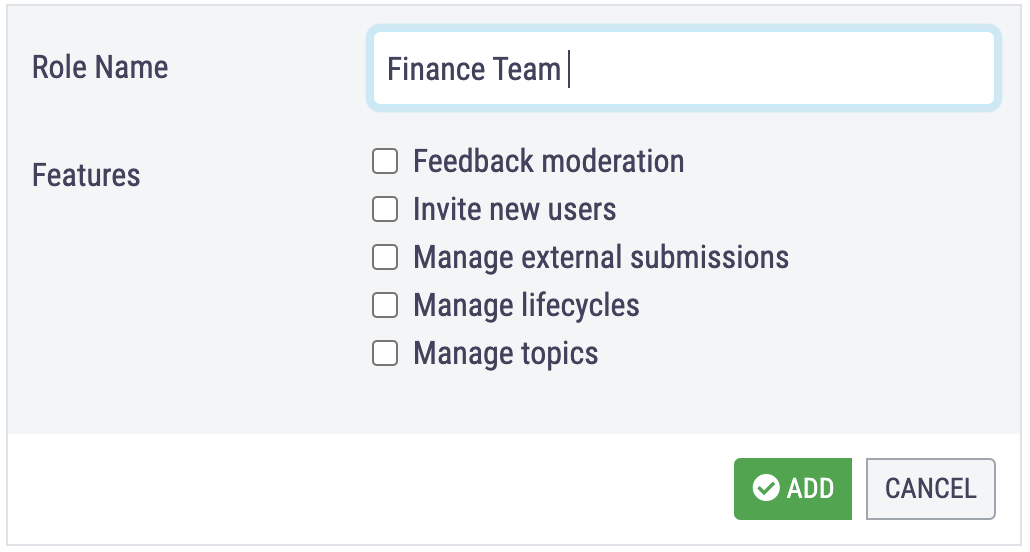
- Type the new of the bespoke role that you are adding in the **Role Name** box.
  
  ![Screenshot 2021-08-03 at 17.27.54](https://knowledge.triaster.co.uk/hs-fs/hubfs/TRIASTER/img/Knowledge%20Base/Screenshot%202021-08-03%20at%2017.27.54.png?width=588&name=Screenshot%202021-08-03%20at%2017.27.54.png)
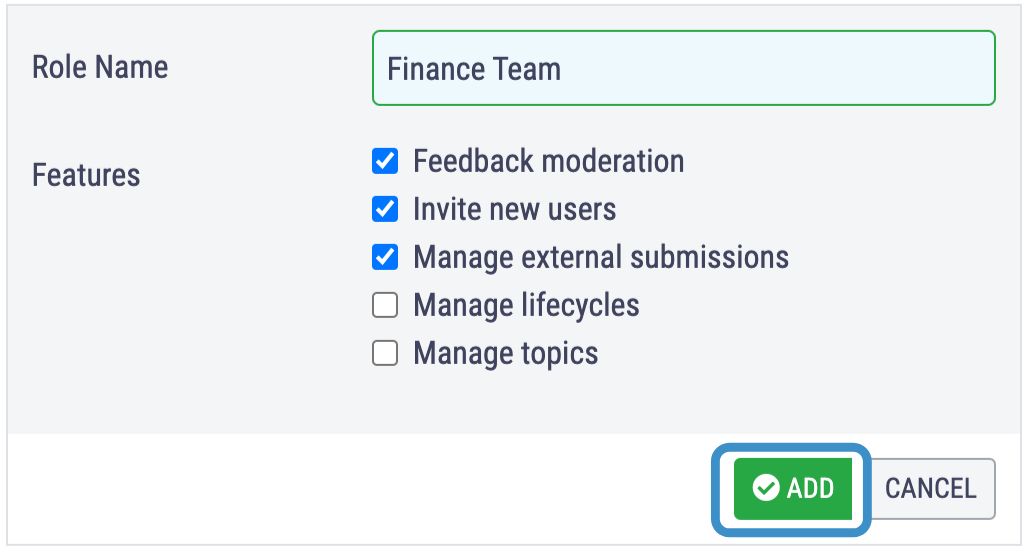
- Check the relevant boxes to give the new role the appropriate permissions or **Features**: 
    - Feedback moderation - assign an owner and to edit the content of an Input.
    - Invite new users - invite anyone to the crowd via email or the join link.
    - Manage external submissions - share and modify the external submission link.
    - Manage lifecycles - add, delete and edit Lifecycles and Stages.
    - Manage topics -  add, delete and rename Topics.

- Click the **Add** button to finish the set up.

![Untitled design (87)](https://knowledge.triaster.co.uk/hs-fs/hubfs/TRIASTER/img/Knowledge%20Base/Untitled%20design%20(87).png?width=588&name=Untitled%20design%20(87).png)

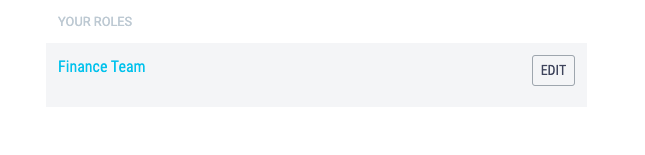
- Once you have set up your Custom Role it will appear under the Your Roles section and you can [add users to it](https://knowledge.triaster.co.uk/assigning-roles) from here.
  
  ![Screenshot 2021-10-01 at 15.52.06](https://knowledge.triaster.co.uk/hs-fs/hubfs/Screenshot%202021-10-01%20at%2015.52.06.png?width=615&name=Screenshot%202021-10-01%20at%2015.52.06.png)


- [Glossary](https://knowledge.triaster.co.uk/glossary)
- [Getting Started](https://knowledge.triaster.co.uk/getting-started)
- [Implementing](https://knowledge.triaster.co.uk/implementing)
- [Optimising](https://knowledge.triaster.co.uk/optimising)
- [FAQs](https://knowledge.triaster.co.uk/faqs)
- [Language Pack - Business Phrasebook](https://knowledge.triaster.co.uk/language-pack-business-phrasebook)
- [Process Execution Pack - Ask The Crowd](https://knowledge.triaster.co.uk/process-execution-pack-ask-the-crowd#main-content)


    - [Glossary](https://knowledge.triaster.co.uk/process-execution-pack-ask-the-crowd#glossary)
    - [Getting Started](https://knowledge.triaster.co.uk/process-execution-pack-ask-the-crowd#getting-started)
    - [Implementing](https://knowledge.triaster.co.uk/process-execution-pack-ask-the-crowd#implementing)
    - [Optimising](https://knowledge.triaster.co.uk/process-execution-pack-ask-the-crowd#optimising)
- [Process Library On-premises](https://knowledge.triaster.co.uk/process-library-on-premises)
- [Process Navigator](https://knowledge.triaster.co.uk/process-navigator)

- Home
- Products
- Pricing
- Blog
- Company

[![triaster-logo](https://knowledge.triaster.co.uk/hubfs/TRIASTER/img/triaster-logo.svg "triaster-logo")](https://www.triaster.co.uk)

<http://www.facebook.com/Triaster> <https://twitter.com/Triaster> <http://www.linkedin.com/company/triaster?trk=fc_badge> <https://www.youtube.com/channel/UC8D3I_TgxNQYEjoyc2QNtlQ>

Copyright © 2026, Triaster Limited